ConvoAI Workshop

Form-finding,
in conversation.

An architecture workshop with ConvoAI, Codex and Rhino.

29 October 2026UoL / Liverpool12:30–14:30 UK
20:30–22:30 Hong Kong
613 KB · ZIP

Your workshop kit.

Two ConvoAI skills. Six prompts.
Everything in one folder.
The project we'll explore
PFA Coffee House concept of overlapping roofs around a shared platform.

PFA Coffee House

Option 3 · Concept to form

Your exercises

Explore. Build. Evolve.

Before you begin

A folder. A fresh start.

Open your workshop kit in Codex desktop.

  1. Extract the whole ZIP

    Keep the Liverpool_Workshop_Student_Pack folder and everything inside it.

  2. Open it as a local Codex project

    The two complete skills are already in .agents/skills/. Start a chat in this folder.

  3. Check your actual tools

    Copy the setup prompt below into your chat. Use your own account and the tutor's model selection.

Read full setup check prompt

Bring Codex desktop and Rhino. Image generation and the live Rhino connection need to be checked in your app with the tutor. The ZIP contains skills and prompts; it does not install a connector. Blender is an instructor demonstration.

If a skill does not appear, restart Codex and reopen the project. Full setup guide · OpenAI skills documentation.

Our workshop case

PFA Coffee House

How can a group of roofs make arrival and shared outdoor space more legible, while keeping a visual connection towards the sea?

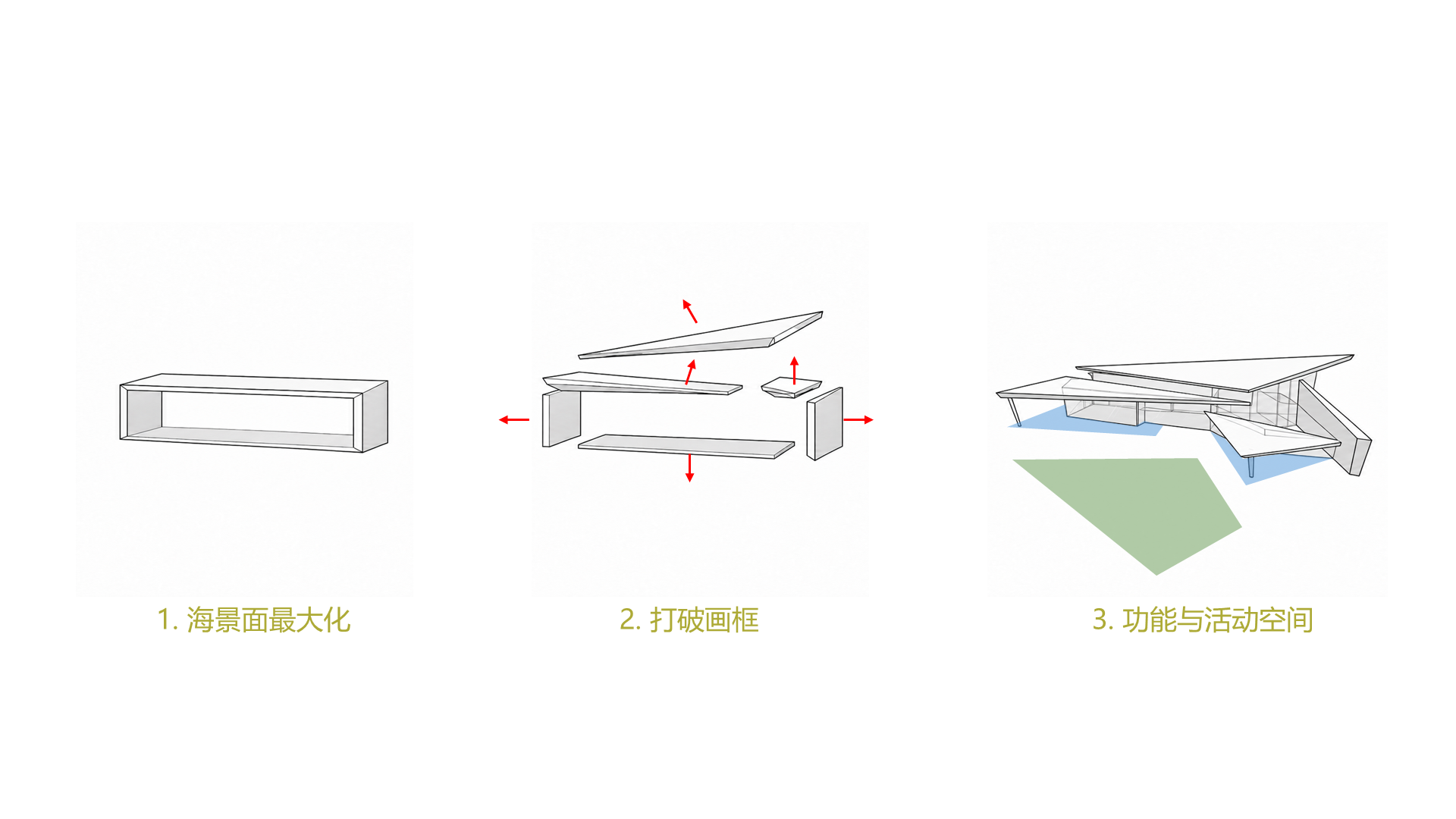
The full PFA Option 3 concept diagram: opening the view, separating the planes, and combining roofs with activity space.

Use the rightmost panel for the 2D exercise. The Rhino exercise starts a separate teaching model with dimensions given in the brief.

Historical Option 3 concept · Henrik Cheung / HAD Studio. The Rhino dimensions are workshop assumptions, not measured client CAD.

Hands-on · Exercise 1

ConvoAI 2D in Codex

Use the 2D skill to explore a design image through analysis, advice, image generation and reflection.

Massing × Divergent1 round

Your outcome: One actual concept image and your reflection.

Read full exercise 1 prompt

Paste the full prompt into your Codex workshop chat. Keep the project files together and save the actual results under outputs/.

Hands-on · Exercise 2

Generate a Rhino model

Connect Codex to Rhino and build the small, editable teaching model from the supplied brief.

Live Rhino connectionEditable BrepsSave & reopen

Your outcome: A baseline model in Rhino, its actual views and a record of the checks.

Read full exercise 2 prompt

Paste the full prompt into your Codex workshop chat. Keep the project files together and save the actual results under outputs/.

Hands-on · Exercise 3

ConvoAI 3D in Rhino

Use the 3D skill on your connected model. Let architectural analysis guide one roof reorganisation.

Massing × Divergent1 round

Your outcome: A changed model, comparable views and a reasoned next design decision.

Read full exercise 3 prompt

Paste the full prompt into your Codex workshop chat. Keep the project files together and save the actual results under outputs/.

Keep your progress

Pick up where you are.

If something gets stuck

Keep the current state. Use this prompt to identify the blocker with your tutor.

Read full recovery prompt

Before you finish

Save the actual results and one next design decision.

Read full save and review prompt
A skill or tool is missing

Check that Codex has opened the extracted folder, including .agents/skills/. Restart if needed. For missing image generation or a live Rhino connection, show the setup check to your tutor. Keep analysis-only work clearly labelled.

How do I know the model worked?

Inspect the actual geometry in connected Rhino, save it, then reopen that file in native Rhino. A written script or a standalone library file does not complete the connected exercise. Keep any failed attempts.

My account hits a limit

Save the message and ask the tutor about pairing or demonstration. The pack does not require a separate paid API, a CLI installation or a change of model to bypass a limit.

How does this fit into the session?

First, the ConvoAI web session using the ARC102 material. Then harness + ConvoAI through Codex, followed by the 8029 project story: site analysis, case studies, sketch to preliminary CAD and form-finding. The three hands-on exercises follow that introduction.